
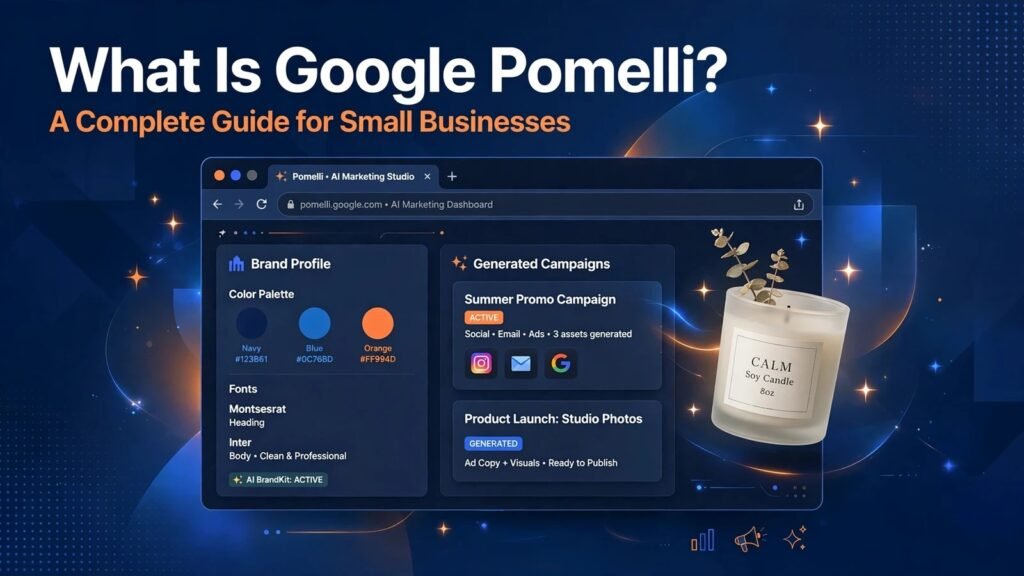
What Is Google Pomelli? A Complete Guide for Small Businesses (2026)

Ask any small business owner what slows their marketing down and the answer is rarely ideas. It’s production. Someone has to design the post, write the caption, resize it for three platforms, and somehow keep it looking like it came from the same brand. Most small teams don’t have a designer for that, so posting becomes irregular, and irregular posting quietly kills reach. That’s the exact gap Google is aiming at with Pomelli. When Google introduced it in October 2025 with a simple “Meet Pomelli” announcement, the pitch was refreshingly narrow: give the tool your website address, and it will learn how your brand looks and sounds, then build marketing content that actually matches. No blank canvas. No uploading your logo for the tenth time. This guide covers what Pomelli is, how it works, what it’s used for, where it’s available, and the question most people are really asking: is it good enough to replace tools like Canva? Short answer: it’s not trying to.
What Is Google Pomelli?
Table of Contents
TogglePomelli is a free AI marketing tool built by Google Labs together with Google DeepMind. It launched as a public beta on 28 October 2025, and it does one job: it turns your existing website into on-brand marketing material, social media campaigns, product photos, short animated videos, even a basic brand book. Two words in that description matter more than the rest. The first is experiment. Pomelli lives inside Google Labs, Google’s testing ground for early products, which means it’s free while Google figures out what it should become, and features can change or occasionally break without much warning. You get tomorrow’s tools today, rough edges included. The second word is brand. Most AI image tools start from a prompt and give you something generic. Pomelli starts from your business. That’s the difference the whole product is built on, and it comes from a feature Google calls Business DNA.
How Pomelli Works: Business DNA Explained
The setup is deliberately simple, because the target user is a busy owner, not a marketing department.
Step 1: Enter your website URL. You go to labs.google.com/pomelli, sign in with a Google account, and paste your website address. That’s the entire onboarding form.
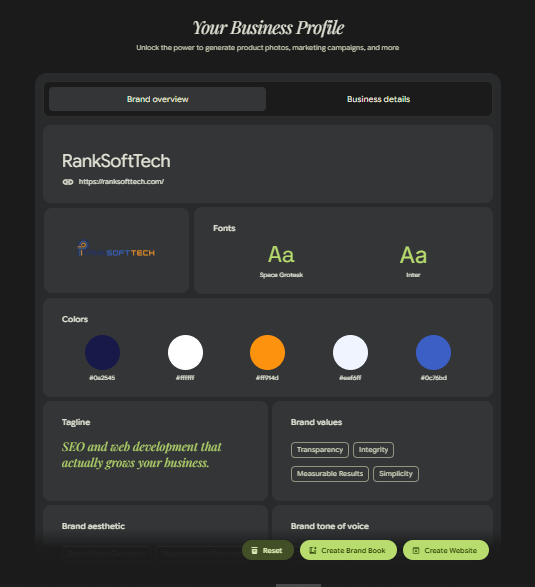
Step 2: Review your Business DNA. Pomelli crawls your site and builds a profile of your brand: fonts, color palette, tone of voice, the images you already use, even the products in your catalog. A Google Business Profile or extra images can be added too. This profile is worth two minutes of your attention. Check it. If the tool picked up an old logo or a color you retired last year, fix it here, because everything Pomelli makes will follow this DNA. Garbage in, garbage out: the old rule survives the AI era.
Step 3: Generate, edit, download. With your DNA in place, Pomelli suggests campaign ideas matched to your business. You pick one (or describe your own goal), review what it creates, edit the wording or images inside the tool, and download the finished assets for Instagram, TikTok, Facebook, YouTube, or LinkedIn.
That’s it. There’s no brand kit to build by hand, which is where tools like Canva usually lose people in the first ten minutes.
What Is Google Pomelli Used For?
People search this exact question a lot, so here’s the practical list, what businesses actually open Pomelli to do:
- Social media campaigns. A sale, a launch, a seasonal push, described in one sentence and turned into ready-made posts in your brand’s style.
- Product photography. Turning one ordinary phone photo into polished studio-style shots (more on this below, it’s the feature getting the most attention).
- Short animated videos. Converting a static post into a moving clip for Reels, TikTok, and Shorts, where video gets more reach than still images.
- A brand book. A tidy summary of your brand’s look and voice, useful when you brief a freelancer or a new hire.
- Quick websites. Pomelli can even generate a simple small-business website from the same Business DNA, though for established businesses this is more of a curiosity.
Notice what ties these together: none of them is marketing strategy. Pomelli handles production, the slow, repetitive making of things. Deciding what to say and why is still on you.
Pomelli Campaigns: Creating Your First Campaign, Step by Step
The Campaigns feature is the front door of the product, and the flow goes like this:
- Click Campaigns and describe your goal in plain language, “Promote our weekend sale on handmade candles to gift buyers” works fine. Write the way you’d brief a person; no prompt-engineering tricks needed.
- Pomelli comes back with a short campaign brief for you to confirm. Read it. This is your one cheap chance to correct the audience, the offer, or the tone before anything gets generated.
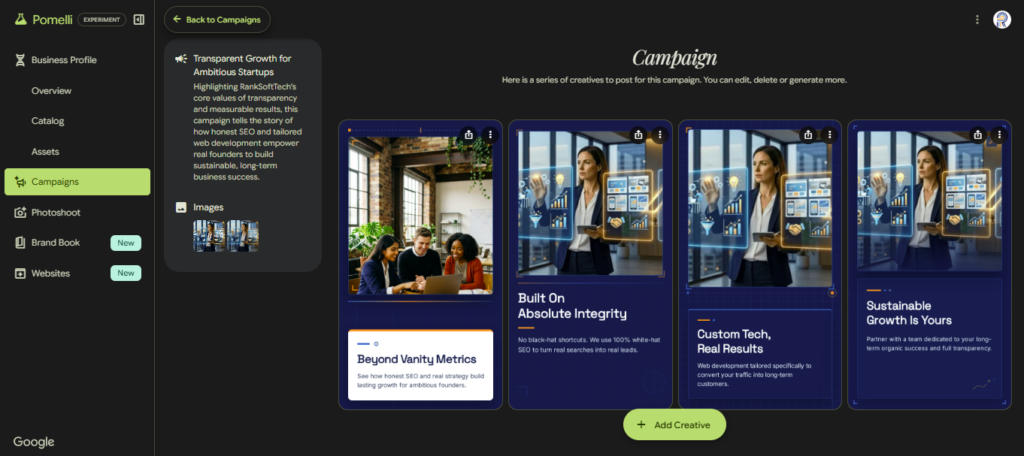
- It then generates a small set of creatives, typically four, built around that brief and styled by your Business DNA.
- Open any creative in the editor to adjust text, fix the layout, or change fonts and colors. There’s even an option to let the AI fix an awkward layout for you.
- Download what you like, in the sizes your platforms need.
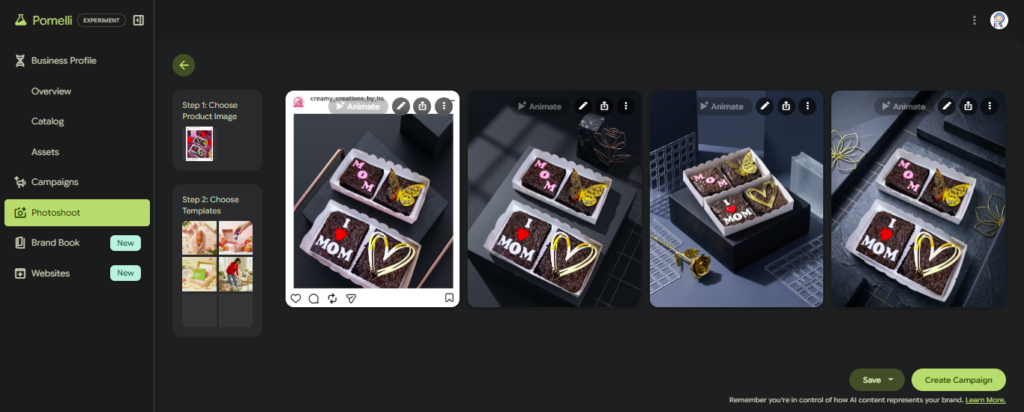
I tested Pomelli on my own agency website, RankSoftTech. I only pasted the URL, and within a minute it had pulled my brand colors, fonts, tagline and even my brand values into a Business DNA profile. The campaign it generated looked genuinely on-brand, although three of the four creatives reused the same image with different headlines. I also tried Photoshoot with a real product photo from a client’s bakery business, and the studio versions looked professional. Even the icing text on the brownies stayed readable, which I did not expect from an AI image tool.
One habit worth building from the start: generate more than you need and publish only the best two or three. AI output follows a curve, a couple of strong results, a couple of average ones. Picking is fast. Fixing a weak creative for twenty minutes is not.
Pomelli Animate: Turn Still Images into Short Videos
Animate arrived in January 2026, and it answers a problem every small brand knows: platforms reward video, but nobody on the team edits video.
Pick any creative you’ve made in Pomelli, hit Animate, and the tool, powered by Google’s Veo 3.1 video model, turns that static image into a short animated clip. You can choose a motion style, so a high-energy sports brand and a calm, premium spa don’t end up with the same movement. The output is made for Reels, TikTok, and YouTube Shorts, downloadable as video or GIF.
Is it a replacement for a real video shoot? No, and it doesn’t pretend to be. It’s for the other 90% of your content, the daily posts where “good motion, on brand, published today” beats “perfect video, published never.”
Google Pomelli Photoshoot: Studio Photos from a Single Snapshot
If one feature explains the buzz around Pomelli, it’s Photoshoot, which launched in February 2026.
The idea is simple. You upload one photo of your product, an honest phone snapshot is fine, choose from preset or custom templates (up to six), and Pomelli generates professional variations: a clean studio-background shot, a floating product shot, a lifestyle image showing it in use, a contextual placement in a realistic setting. Edit any version with a text prompt, download it, or save it back into your Business DNA for future campaigns.
For an e-commerce seller, this is the expensive part of marketing quietly becoming cheap. A studio, a photographer, and a day of shooting used to stand between a small shop and decent product imagery. Now it’s an upload.
Read this before you publish a Photoshoot image. Google itself warns that AI can alter fine product details. Check labels, logos, text, and colors carefully against the real product before anything goes live, especially for food, cosmetics, or anything with regulated wording. An AI that “improves” the text on your label has not done you a favor.
Is Google Pomelli Free?
Yes, for now. Pomelli is free to use during its public beta, with no separate subscription. Sign in, and you’re in.
The “for now” deserves respect, though. Google hasn’t announced future pricing, and Labs experiments either become full products (usually with a paid tier), get absorbed into another Google product, or get shut down. Enjoy the free ride, just don’t build your entire content workflow on a beta, or fire every other tool you own on day one.
Pomelli Pros and Cons
What’s good:
- It’s free during the beta, and the value-for-zero is hard to argue with.
- Business DNA is a genuine idea, not a gimmick. Brand consistency is where small-business AI content usually falls apart, Pomelli attacks exactly that.
- It’s all-in-one: campaigns, product photos, animated video, and a brand book.
- Almost no learning curve. If you can describe what you want in a sentence, you can use it.
What’s not:
- It’s a beta, and it behaves like one sometimes, occasional errors or slow generation when the service is busy.
- English only, which limits some markets.
- Availability still depends on your country (next section).
- Output quality rises and falls with your website. A clean, consistent site gets strong results; a messy, outdated site feeds Pomelli a confused brand, and the output shows it.
- Fine details in generated images can’t be trusted blindly, see the Photoshoot warning above.
Where Is Google Pomelli Available?
Pomelli started small: at launch in October 2025 it was open only in the United States, Canada, Australia, and New Zealand, in English. Through 2026 Google expanded it widely, 170+ countries in total, and it’s still a Google Labs experiment, so the list can change.
The reliable way to check your own country is unglamorous: open labs.google.com/pomelli while signed in. If the tool lets you in, you’re covered; if you hit a region message, you’re not on the list yet. For something Google adjusts quietly, the official page is the only source that can’t be out of date.
Pomelli vs Canva: Which Should a Small Business Use?
This comparison comes up constantly because Pomelli gets described as a “Canva alternative.” That framing is half right; they overlap, but they start from opposite ends.
| # | Google Pomelli | Canva |
Starting point | Your website, brand learned automatically | A blank canvas or a template |
Brand setup | Business DNA, built for you | Brand Kit, built by you |
Main strength | Fast, on-brand campaign generation | Total design control, huge template library |
Product photos | Built-in Photoshoot feature | Available through apps/marketplace |
Video | Animate, from your own creatives | Full video editor |
Price | Free (beta) | Free plan; paid tiers for full features |
Best for | Owners who want content made for them | Anyone who wants to make and control the design |
The honest verdict: if your problem is “I never get around to posting because making content takes too long,” Pomelli is built for you. If your problem is “I know exactly what I want this design to look like,” Canva gives you the control Pomelli doesn’t try to. Plenty of businesses will use both, Pomelli for the weekly flow of posts, Canva for the one-off design that needs a human hand on every pixel.
Best Google Pomelli Alternatives
If Pomelli isn’t available in your country yet, or you want more control, these are the closest alternatives:
- Canva: the default choice. A massive template library, a proper brand kit on paid plans, and a gentle learning curve. It won’t learn your brand from your website like Pomelli does, but it gives you far more design freedom.
- Adobe Express: a good fit if your business already lives in Adobe’s ecosystem, with strong templates and quick social tools.
- Predis.ai: an AI-first social media tool that generates and schedules posts, aimed at small businesses that want the whole workflow in one app.
Each trades Pomelli’s automatic brand learning for something else, control, ecosystem, or scheduling. Pick based on which of those you actually miss.
Is Pomelli Worth It for Your Business?
If you’re a small business owner doing your own marketing, yes, try it this week. It costs nothing, setup takes minutes, and even if you only use Photoshoot, you’ll likely get your “payment” back in one afternoon of product images.
If you already have a designer or an agency, Pomelli is less of a revolution and more of a useful side tool, handy for drafts, variations, and quick ideas before the real work starts.
And if your website is outdated or messy, fix that first. Pomelli reads your site as the truth about your brand. A better website now literally makes your AI-generated marketing better too, a new argument for an old piece of advice.
FAQs
What is Google Pomelli used for?
Pomelli creates on-brand marketing content for small businesses: social media campaigns, product photos, short animated videos, and a brand book. You give it your website address, it learns your brand, and then generates ready-to-edit content from that profile instead of a blank page.
Is Google Pomelli free?
Yes. Pomelli is completely free while it’s in public beta inside Google Labs. Google hasn’t announced future pricing, so treat the free access as a beta benefit rather than a permanent promise.
Where is Google Pomelli available?
It launched in the US, Canada, Australia, and New Zealand in October 2025 and has since expanded to more than 170 countries. Availability can change, so the only certain check is opening labs.google.com/pomelli while signed in.
Does Google Pomelli have an app?
No. There is no official Pomelli app on the App Store or Google Play, and no official APK to download. Pomelli runs only in a browser at labs.google.com/pomelli. Any site offering a “Pomelli app download” isn’t from Google, and isn’t safe.
How does Pomelli's Business DNA work?
Business DNA is the brand profile Pomelli builds by analyzing your website: your fonts, colors, tone of voice, images, and product catalog. Every campaign, photo, and video is styled from this profile, which is why checking and correcting it is the most important step in the setup.
Can Pomelli replace Canva or a designer?
Not fully. Pomelli is faster for everyday content because it generates the material for you, but Canva gives you far more design control, and a good designer brings judgment no tool currently has. For most small businesses, Pomelli handles the volume; humans handle the important pieces.
Can Pomelli create videos?
Yes. Its Animate feature, launched in January 2026 and powered by Google’s Veo 3.1 model, turns a static creative into a short animated video in styles suited to Instagram Reels, TikTok, and YouTube Shorts. You can download the result as a video or GIF.
Is Pomelli safe to use for product photos?
Mostly, with one important check: Google warns that AI can alter fine details in generated images. Before publishing a Photoshoot image, compare labels, logos, text, and colors against your real product, especially for food, cosmetics, or regulated products.
Final Thoughts
Pomelli isn’t the flashiest AI launch of the year, and that’s partly why it matters. It doesn’t ask small businesses to learn a new skill or hire a new person. It reads the website you already have and hands you back marketing content that looks like you made it on a good day, with time to spare.
That idea, tools that start from your brand instead of a blank page, is bigger than one experiment. It’s the direction AI powered marketing is heading, and businesses with clean, consistent brands will get the most out of every tool that follows.
If you’d rather spend your time running your business than feeding content tools, that’s exactly the kind of work we help small businesses with at RankSoftTech, from the website Pomelli reads, to the strategy behind what it creates.
